Requirements
- Supports SFTP
- Threading
- Transfer huge files
- Support logging
FTP Servers
I found two good FTP servers for testing purpose and I will list down the details of configuring them.
1. FileZilla, FTP server
Just like its famous FTP client, it also has a fast reliable FTP server. You can get it from here – https://filezilla-project.org/download.php?show_all=1&type=server
It’s a free software, so no evaluation or any other stuff. Once downloaded, it will be installed as a service and you can choose the option to start when windows starts or you can start it manually
Configuration
- On the toolbar, click the icon, ‘Display the user accounts dialog’
- Click on ‘General’ node, select ‘Enable account’, click on ‘Add’ and type the user name
- Click on ‘Shared folders’ , click on ‘Add’and select the folder you would like to share
2. Core FTP Server
Downloaded the software from here – http://www.coreftp.com/download.html
After installing, click on ‘Setup’ ( see below )
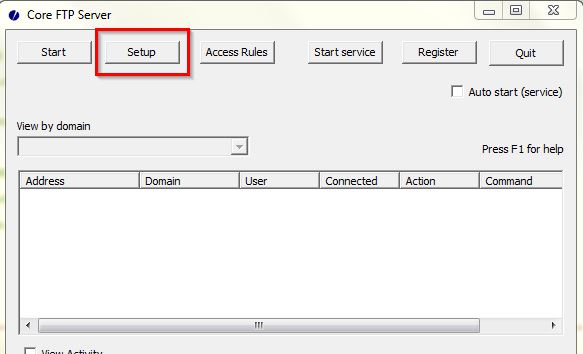
- click on ‘New’
- In the ‘Domain/ IP Address’ textbox, enter 127.0.0.1
- Now click on ‘Virtual Paths’ and choose the directory you would like to share, click on ‘OK’
In the user section, click on ‘New‘
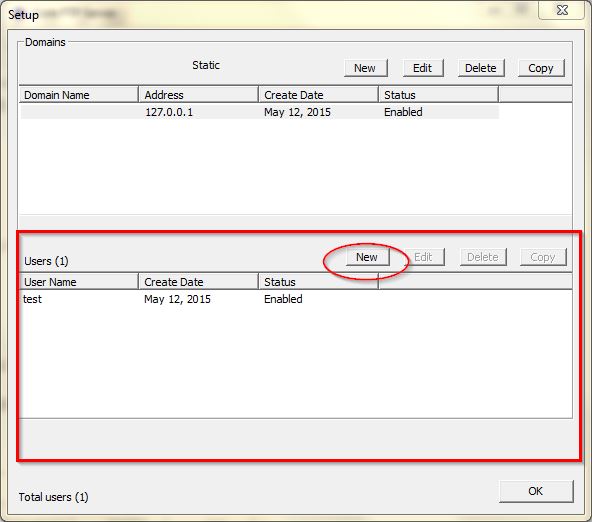
In the next screen, user name and password, and also the home directory
NOTE: The username will be visible ONLY AFTER you select the IP address/ domain from the section ‘Domains’
FTP Client – Connecting using .net
Simple clear text, user name and password
1.