Problem : When computer wakes up from sleep, wi-fi won’t connect and I have to pull out the USB dongle and plug it, back in.
Solution : Found out that, the issue is because, after sleep, the usb wifi adapter, would not wake up
- Right click ‘File explorer‘
- Select ‘More‘, go to ‘Manage‘
- From the pane of the left, select ‘Device Manager‘
- Click Network Adapters arrow to expand, then right click your wifi adapter
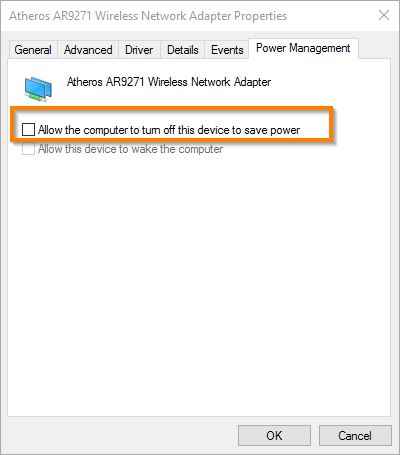
- Properties > Power Management
- De-select the box that says “Allow the computer to turn off this device to save power”.
Thanks to rom the comment section of http://www.redmondpie.com/fix-no-wi-fi-available-after-windows-10-upgrade-issue-heres-how for the solution