Problem statement : I wanted to connect my guitar and mic to the audio interface, to jam with my friends and use both of them simultaneously through skype. I found that Skype picks up only the left channel ( one channel ), which means the other channel will not be heard.
That means, I will have to looks for routing/ mixing options.
This is what I did
- Got myself Virtual audio cable ( http://software.muzychenko.net/eng/vac.htm )
- Installed voice meeter from here – http://vb-audio.pagesperso-orange.fr/Voicemeeter. Its a free software
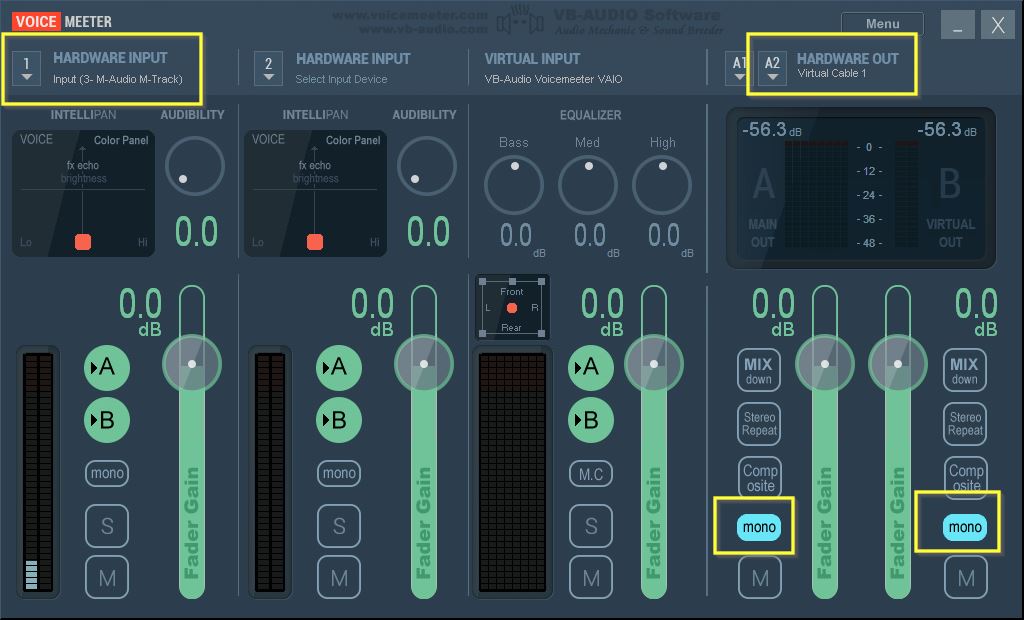
Did the following settings in VoiceMeeter
- Hardware Input : Input ( 3- M Audio M-Track)
- Hardware out: Virtual cable 1
- Set both the channels as Mono and Mono ( see screenshot above)
Finally, opened skype, changed the input to ‘Virtual Cable 1’
You can find a detailed tutorial here
A few words about VoiceMeeter and VAC
Voicemeeter has special controls for increasing/ decreasing bass or treble. Also you can introduce voice effects for one channel and mix them together.
combine this with the fact that, you can use voice meeter along with VAC, then the options are endless. You could have the skype output recorder and re routed ( using VAC) and also have amazing jamming session with voice modulated using Voice Meeter
Another thing you could try out is, try connecting two audio interfaces and try to mix both of them into one channel. May be, jack audio ( mentioned below ) or VAC could come in handy.
Other software options
Audio Jack
Very powerful software. Has lot of options, but I could not figure out, how to use it
http://jackaudio.org/
Virtual Audio cable
Although everything was configured correctly, there was considerable delay, while listening and right channel was not captured in skype. The configuration I used was. That is,
- Open ‘Audio Repeater MME ‘( KS did not allow of configuring mono channel). Select ‘Custom’, FL ( left channel ) of the audio interface to Line 1 cable ( Make sure you select number of channels as 1)
- Open one more instance of ‘Open ‘Audio Repeater MME’ . Select ‘Custom’ again and choose FR and FC of the audio interface to Line 1 cable
NOTE: If you see any underflow, please increase the total buffer ( ms)
Hardware options that I tried
I bought a 3.5mm female stereo to two RCA cable and connected it to the CD input of the Hartke bass amp. Connected guitar cable to the ‘input’ on the amp. Tried the following, to the audio interface
- Connected to preamp out ( big blasting sound, luckily everything was fine)
- Connected to headphones (no sound)
- Connected to speaker out ( there was a loud thud sound, luckily everything was fine, by the Grace of God)
Also you can refer,