Gigabit Ethernet was something I had been dreaming for years and it has come true today at my home. I am happy beyond measure. Thank you God 🙂
What that means ?
I could now copy a file which is over a GB between two systems in my home network, in under 10 seconds ! Now, I can assure you, those are really fast speeds.
The speed rates are shown below. I got anywhere between 110 to 125 megabytes/ second. Network utilization was over 90%, clearly showing the efficient utilization of the network, thanks to quality network cards, switch and LAN cable
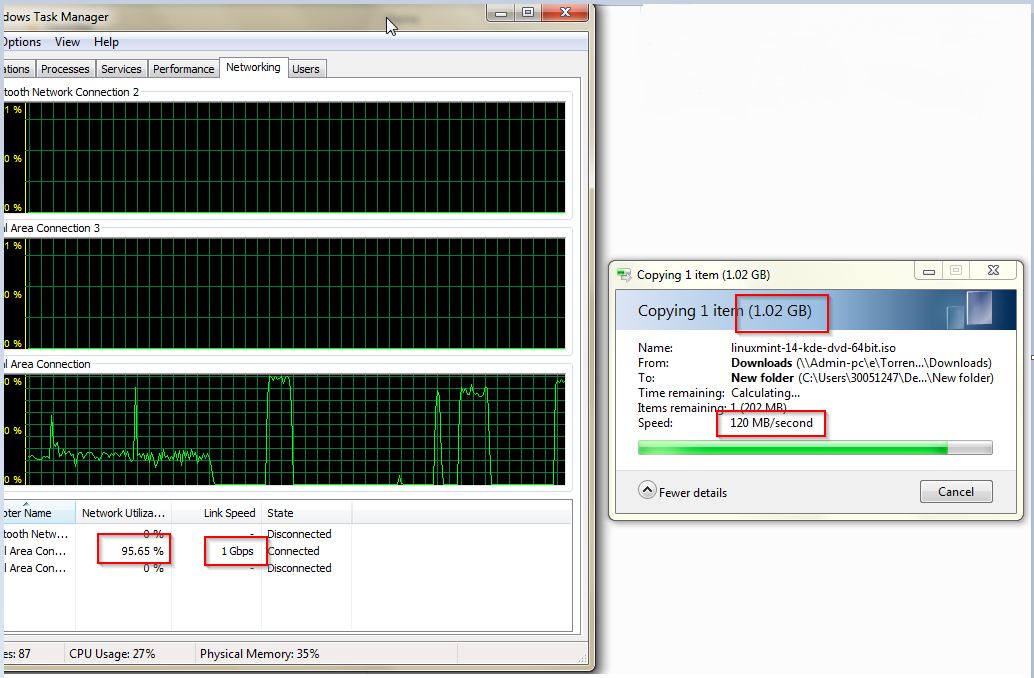
9 seconds to copy a 1 GB file. Not bad.
4 things happened during the weekend, that made this possible :
- Fedex delivered the 100 meter, category 5e cable at my home ( Brand name : Enter )
- I learned how to crimp a LAN cable( See Video 1 below to learn it) and that way I could wire my home the way I want it 🙂
- I learned how to use a LAN Tester( See Video 2 below to learn it), so that I could check the LAN wire immediately to see if it works, rather than wait until I connect it to a computer. This is a BIG time saver ( I had already ordered a LAN tester from Ebay, and had it delivered last week )
- I put the 5 port TP Link Switch (TP-Link 5-Port Gigabit Desktop Switch -TL-SG1005D) ) to good use. I had ordered it from snapdeal
NOTE
- My Office Laptop and my Desktop system already had Gigabit ports ( Gigabit supporting network cards, that is, cards that support 10/100/1000 speeds )
- When you are buying cable make sure you get cables rated as one of these : 5e, 6 or 6a. Since only these supports Gigabit Ethernet
Video 1 : How to crimp a lan cable
Video 2: How to use a LAN tester
Excellent Article Justin!!! Am waiting forward for your upcoming blogs.. Am sure you have got a lot of interesting knowledge to share 🙂
Thanks a lot Melvin. That comment means a lot.