Recently I faced a strange problem when viewing a website in our regional language. The website should have been displayed in the local Malayalam language, but see what happened(see the pic below)
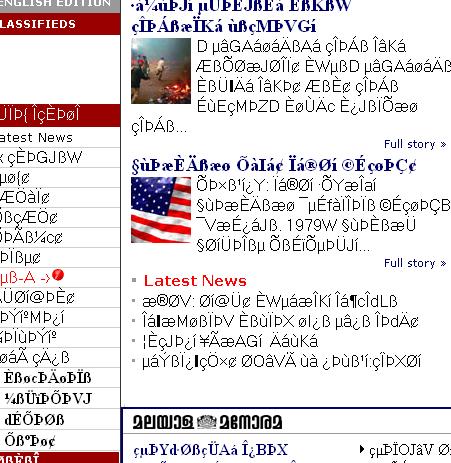
I was taken aback, i was hoping to read some malayalam news( it was a Malayalam news site) but instead, i could only find some junk characters on the screen. When I scrolled down, I found the link for downloading the font for the site. So in case if you face such a problem in the future, get the font for your language first then follow the steps furnished below. I believe you would find it useful
1. Get the fonts – Luckily for me, I got it from the site itself. If you don’t find that way, you must Google for it
2.Install the font – I am describing the steps for XP(If you happen to use Linux and know how to do this in Linux, please post it as comment to his post)Copy the font to the font directory.
That is, Control Panel > Fonts > and the paste the font file(a file with ttf extension) into that directory.You must be in “Classical View” to do this
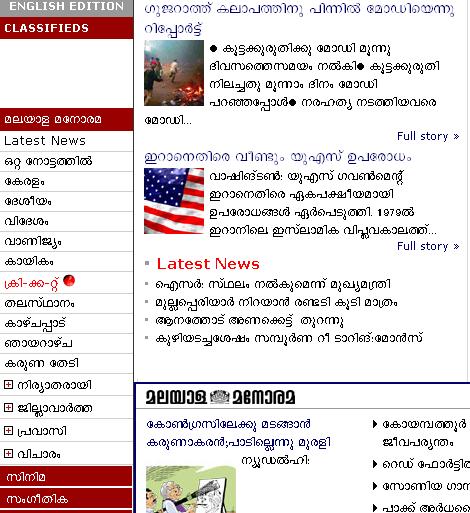
3. Next open Firefox. Go to View > character Encoding > More Encoding > User Defined. Voila, the whole page suddenly transforms to this(see pic below), after you press the refresh button.
As we always do, after reading your post, i Googled for it and found the result (I believe so ) in the very first place. It reads….:
(Better refer the link ok?)
…………….
……………
Run ttmkfdir > fonts.dir
Run ttmkfdir > fonts.scale
……………
………………..
/usr/X11R6/bin/xset fp rehash
Open the browser and change the character encoding to “User Defined”
Or better refer to
http://www.manoramaonline.com/cgi-bin/MMOnline.dll/portal/ep/content/footer/footerHtmls.jsp?tabIDForMMEnglish=1&tabId=1&contentHtml=FAQ&BV_ID=@@@